Build Lab · Lab 02 · 2:33
Turn scanned invoices into SQL data with Python OCR
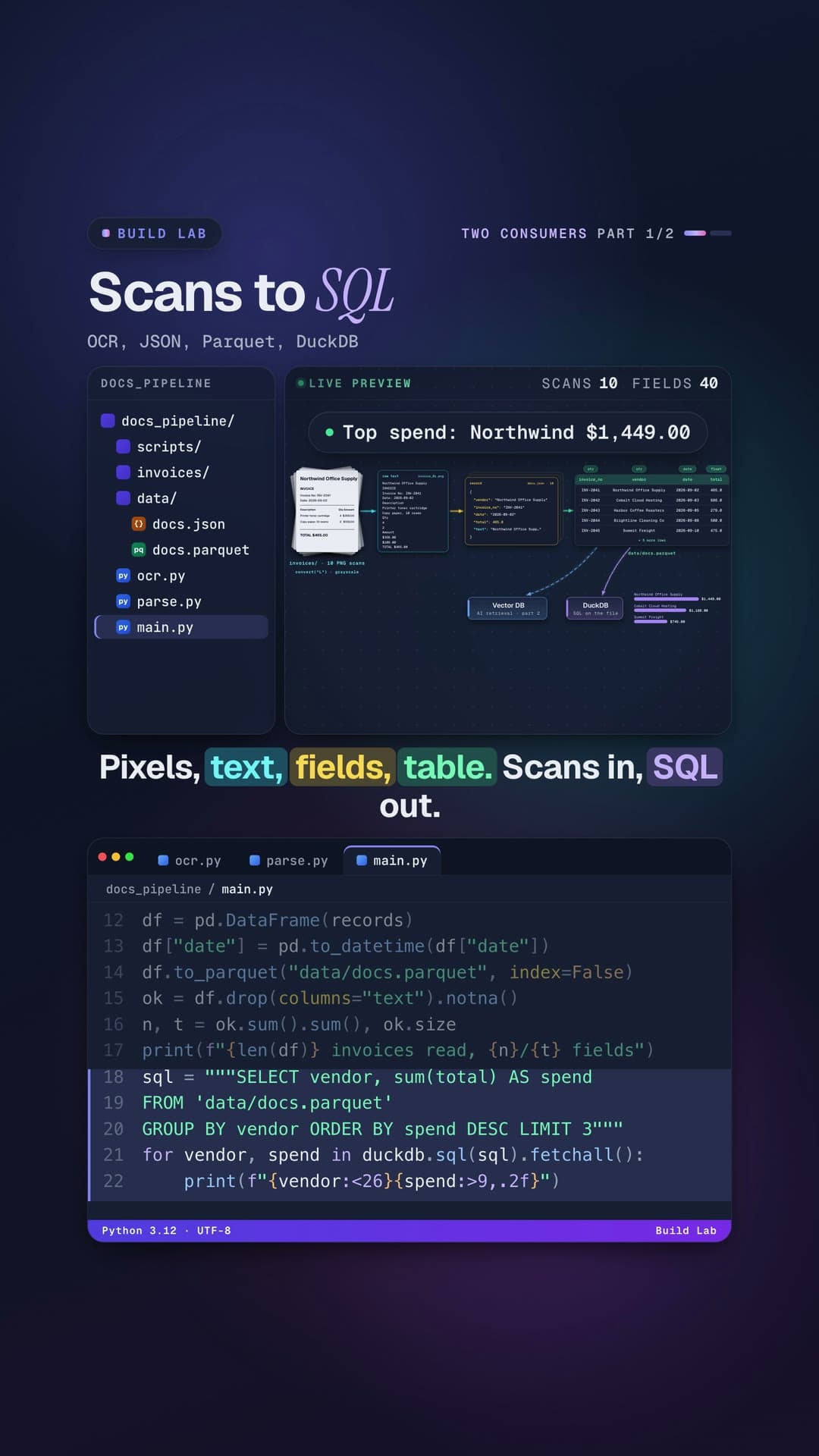
A weekend project: 10 scans go through Tesseract OCR into JSON, Parquet and DuckDB, with all 40 of 40 fields extracted. The top supplier is Northwind Office Supply at $1,449.00, and Part 2 adds questions in plain English.
What you’ll needPython 3.10+, pandas, PyArrow, DuckDB, pytesseract, Pillow, fastembed, LanceDB, Tesseract OCR
What you’ll need
- python.org/downloads →
 Python 3.10 or newerRuns the code. Check yours with
 python3 --version. - code.visualstudio.com →

 VS Code or CursorEither works; so does any editor you like.
 - git-scm.com/downloads →
 gitGets the code from GitHub.
  pandas 2.2+Tables
pip install "pandas>=2.2"- PyArrow 15+Writing Parquet files
pip install "pyarrow>=15"  DuckDB 1.0+SQL on files and tables, no database server
pip install "duckdb>=1.0" pytesseract 0.3.10+Calls Tesseract from Python
pip install "pytesseract>=0.3.10" Pillow 10+Makes and opens the invoice images
pip install "pillow>=10" fastembed 0.4+Turns text into embeddings
pip install "fastembed>=0.4" LanceDB 0.10+Stores and searches the vectors
pip install "lancedb>=0.10"- Tesseract OCRReads the text in each scan (a program, not a Python package)
brew install tesseract
Set it up
- 1Get the code
git clone https://github.com/DayanEbrar0X/data-anatomy.ai.git
cd data-anatomy.ai
- 2Make a virtual environmentIt keeps this project's packages separate from the rest of your computer.
python3 -m venv .venv
source .venv/bin/activate
- 3Install the packagesrequirements.txt installs every lesson's packages. This one needs only: pandas, PyArrow, DuckDB, pytesseract, Pillow, fastembed, LanceDB.
pip install -r requirements.txt
# or just this lesson:
pip install "pandas>=2.2" "pyarrow>=15" "duckdb>=1.0" "pytesseract>=0.3.10" "pillow>=10" "fastembed>=0.4" "lancedb>=0.10"
- 4Install Tesseract OCRReads the text in each scan (a program, not a Python package)
brew install tesseract            # macOS
sudo apt install tesseract-ocr  # Debian / Ubuntu
tesseract --version
- 5Run it
cd data-engineering/build-lab-02-documents-to-data
cd docs_pipeline
python3 main.py      # Part 1
python3 search.py    # Part 2
Project structurebuild-lab-02-documents-to-data/
Project structure
data-engineering/build-lab-02-documents-to-data/Open on GitHub →
- docs_pipeline/
- data/output only (created when you run)
- invoices/10 scanned invoice PNGs
- invoice_01.png … invoice_10.png10 files
- scripts/
- make_invoices.pydrew the invoice images
- embed.pyPart 2, file 1: text to vectors
- main.pymainPart 1, file 3: JSON, Parquet, DuckDB
- ocr.pyPart 1, file 1: pixels to text
- parse.pyPart 1, file 2: text to fields
- search.pyrunPart 2, file 3: question to prompt with sources
- store.pyPart 2, file 2: vectors into LanceDB
- README.mdthe idea, how to run it, a line-by-line walkthrough, things to try
data-engineering/build-lab-02-documents-to-data/docs_pipeline/main.pyOpen on GitHub →
import json
import duckdb
import pandas as pd
from ocr import ocr_folder
from parse import parse

texts = ocr_folder("invoices")
records = [parse(t) for t in texts.values()]
with open("data/docs.json", "w") as f:
    json.dump(records, f, indent=2)

df = pd.DataFrame(records)
df["date"] = pd.to_datetime(df["date"])
df.to_parquet("data/docs.parquet", index=False)
ok = df.drop(columns="text").notna()
n, t = ok.sum().sum(), ok.size
print(f"{len(df)} invoices read, {n}/{t} fields")
sql = """SELECT vendor, sum(total) AS spend
FROM 'data/docs.parquet'
GROUP BY vendor ORDER BY spend DESC LIMIT 3"""
for vendor, spend in duckdb.sql(sql).fetchall():
    print(f"{vendor:<26}{spend:>9,.2f}")
Transcript
These invoices are just pictures. In three files, they become data you can query with SQL. Here's a project you can build over a weekend. Pixels to text.
Text to fields. Fields to a table. Our folder holds ten scanned invoices from six vendors. A small script drew them with Pillow, so every run is identical.
File one: ocr.py. To a computer, a scan is only pixels: a grid of brightness values, with no letters inside. Pytesseract calls Tesseract, a free OCR engine.
Optical character recognition: pixels in, characters out. For every PNG in the folder, we open it and convert it to grayscale. Tesseract finds each line of text, then recognizes it character by character. We keep each file's text, keyed by its name.
File two: parse.py. Raw text is one long string. We want a schema: the same named fields for every invoice.
Each field is a pattern. Invoice number: INV, then digits. The date: year, month, day. The total: a dollar amount.
In parse, we drop the blank lines, and the first line is the vendor. Each pattern searches the text, ignoring case. OCR read one capital I as a small i. The total becomes a real number, and we keep the full text.
Part two needs it. File three: main.py. OCR every scan, parse every text, and save the records as JSON.
Then pandas builds a table, dates become real dates, and we write Parquet. Parquet stores each column together, typed and compressed, so tools read only the columns they need. A quick check: how many of the forty fields did we find? And DuckDB runs SQL right on the Parquet file.
Spend by vendor, no database server. Let's run it. Ten invoices read. Forty out of forty fields found.
Northwind Office Supply leads with $1,449, then Cobalt Cloud, then Summit Freight. Here's the real payoff. This one table can now serve two consumers. SQL analytics, like this query.
And AI retrieval: next time, we embed the same text into a vector database. Pixels, text, fields, table. Scans in, SQL out.
Read the full article →- #ocr
- #dataengineering
- #python
- #automation